Temporal's Deep Agents Integration and Payload Limits
Temporal is a durable execution framework. It recently added a developer-preview integration for LangChain Deep Agents — the package is temporalio.contrib.deepagents, and it still carries an “experimental, may change” warning. The idea is simple: take an existing Deep Agents program and make it durable — crash-safe, retryable, resumable — by adding one plugin. No changes to the agent code itself.
Here’s how that works under the hood. The agent’s control loop — deciding which tool to call, what to say next, when to hand off to a sub-agent — runs inside a Temporal Workflow. It’s deterministic, so it can replay safely after a crash. Everything else — every model call, every tool call — runs as a Temporal Activity instead. DeepAgentsPlugin registers four activities for this: invoke_model, invoke_model_streaming, invoke_tool, and backend_op. A few helpers connect your code to them: TemporalModel for the LLM, tool_as_activity() and activity_as_tool() for tools, and TemporalBackend for real I/O like files or shell commands.
This post walks through one specific error: a tool call whose result is too large. It’s a scenario that can come up naturally when integrating Deep Agents with Temporal this way, and this post documents exactly what happens.
Reproducing an oversized tool result
When an Activity finishes, its result has to travel back to the server as a Payload over gRPC. That’s the part this test targets. Below is a mock web_search tool. Its description reads like a real search tool — that’s what the LLM sees — but the code always returns 6 MB of filler text instead of a real result. Think of it as standing in for a tool that fetched a page and got back something huge:
1
2
3
4
5
6
7
8
9
10
11
12
13
14
15
16
# deepagents_hello_world/tools.py
"""Mock tools used to exercise Temporal's gRPC / payload size limits."""

from langchain_core.tools import tool

# The docstring below is what the LLM sees, so it reads like a real tool.
# The function itself is a mock: it ignores `query` and always returns 6 MB
# of text - past both size limits this post covers.
_OVERSIZED_MB = 6.0


@tool
def web_search(query: str) -> str:
    """Search the web for `query` and return the most relevant result as raw text."""
    n_bytes = int(_OVERSIZED_MB * 1024 * 1024)
    return "x" * n_bytes
The tool is wrapped with tool_as_activity() and given to a real deep agent. The agent runs on a local LLM through Ollama (hermes3:8b), and it decides on its own to call the tool:
1
2
3
4
5
6
7
8
9
10
11
12
13
14
15
16
17
18
19
20
21
22
23
24
25
26
27
28
29
30
31
32
33
34
35
36
37
38
39
40
41
42
43
44
45
46
47
48
49
50
51
52
53
54
55
56
57
58
59
60
# deepagents_hello_world/size_limit_workflow.py
from datetime import timedelta

from deepagents import HarnessProfile, create_deep_agent, register_harness_profile
from temporalio import workflow
from temporalio.common import RetryPolicy
from temporalio.contrib.deepagents import tool_as_activity
from temporalio.exceptions import ActivityError

from deepagents_hello_world.tools import web_search

# Keep this a plain string, not a model object. That's what lets
# DeepAgentsPlugin wrap it in a TemporalModel, so the LLM call runs as a
# real Temporal activity instead of inline in the workflow.
MODEL = "ollama:hermes3:8b"

# Small local models get distracted by deepagents' built-in tools and tend
# to describe what they're about to do instead of calling a tool. This
# agent only needs web_search, so the rest are turned off here.
register_harness_profile(
    "ollama",
    HarnessProfile(
        excluded_tools=frozenset(
            {"write_todos", "ls", "read_file", "write_file", "edit_file",
             "glob", "grep", "execute", "task"}
        ),
    ),
)

# One attempt only - a size-limit failure won't succeed on retry.
oversized_search_tool = tool_as_activity(
    web_search,
    start_to_close_timeout=timedelta(seconds=30),
    activity_options={"retry_policy": RetryPolicy(maximum_attempts=1)},
)


@workflow.defn
class SizeLimitAgent:
    """A real deep agent, using a real LLM, wired to a web_search tool that
    returns an oversized mock result."""

    @workflow.run
    async def run(self, question: str) -> str:
        agent = create_deep_agent(
            model=MODEL,
            tools=[oversized_search_tool],
            system_prompt=(
                "Rule: for every user message, your ONLY allowed action is "
                "to call the tool named web_search with the user's message "
                "as the `query` argument. Never answer in plain text."
            ),
        )
        try:
            result = await agent.ainvoke(
                {"messages": [{"role": "user", "content": question}]}
            )
            return result["messages"][-1].content
        except ActivityError as e:
            return f"web_search activity failed (as expected): {e.cause or e}"
Getting a small local model to reliably call the tool, instead of just describing what it planned to do, took two extra steps. First, setting temperature=0 on the worker’s model, through a custom model_provider passed to DeepAgentsPlugin — the LLM call still runs as a real activity this way. Second, turning off deepagents’ built-in planning and file tools with HarnessProfile, which otherwise pull an 8B model’s attention away from the one tool it actually has.
Running it against a local dev server and worker:
1
2
$ uv run python run_size_test.py "Search for 'temporal grpc size limits' and tell me what you find."
Result: web_search activity failed (as expected): PayloadsTooLarge: [TMPRL1103] Attempted to upload payloads with size that exceeded the error limit.
The Workflow history shows the order this happened in: the model ran first, then chose to call the tool:
1
2
3
4
7  ACTIVITY_TASK_SCHEDULED -> deepagents.invoke_model
9  ACTIVITY_TASK_COMPLETED
13 ACTIVITY_TASK_SCHEDULED -> deepagents.invoke_tool
15 ACTIVITY_TASK_FAILED -> [TMPRL1103] Attempted to upload payloads with size that exceeded the error limit.
The tool executed fine — the failure happens when the worker tries to hand the result back to Temporal.
Here’s the same run in the Temporal Web UI. The workflow’s input and result are at the top. On the timeline, invoke_model (the LLM call to hermes3:8b) takes most of the ~31 seconds, then invoke_tool for web_search fails almost right away, shown in red:
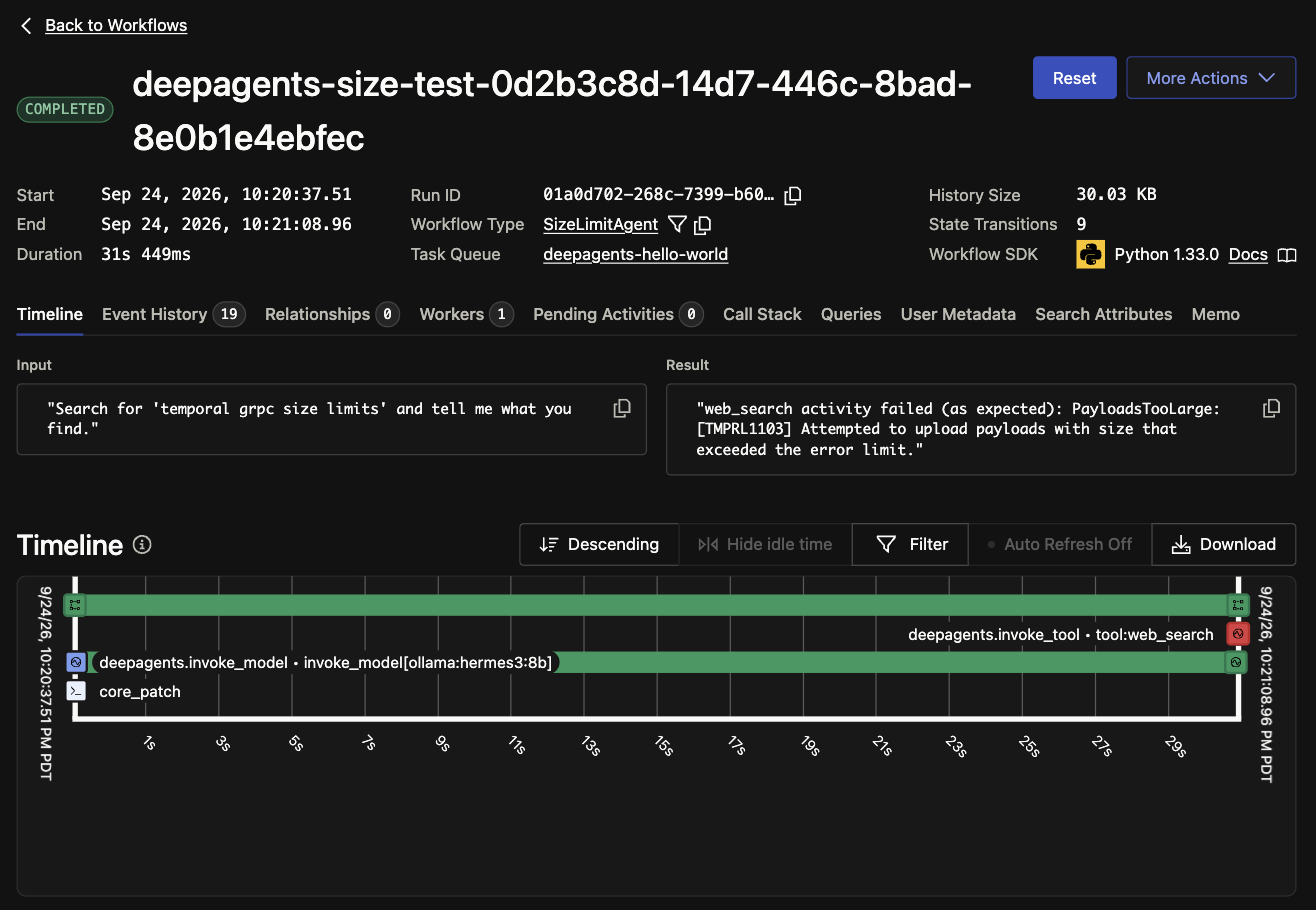 The Timeline view: the model call completes, then the
 web_search tool activity fails.
Clicking the failed invoke_tool activity shows its events. The input is tiny — just the query the model chose. The activity started, ran for 15 ms, then failed with PayloadsTooLarge once the worker tried to upload the 6 MB result:
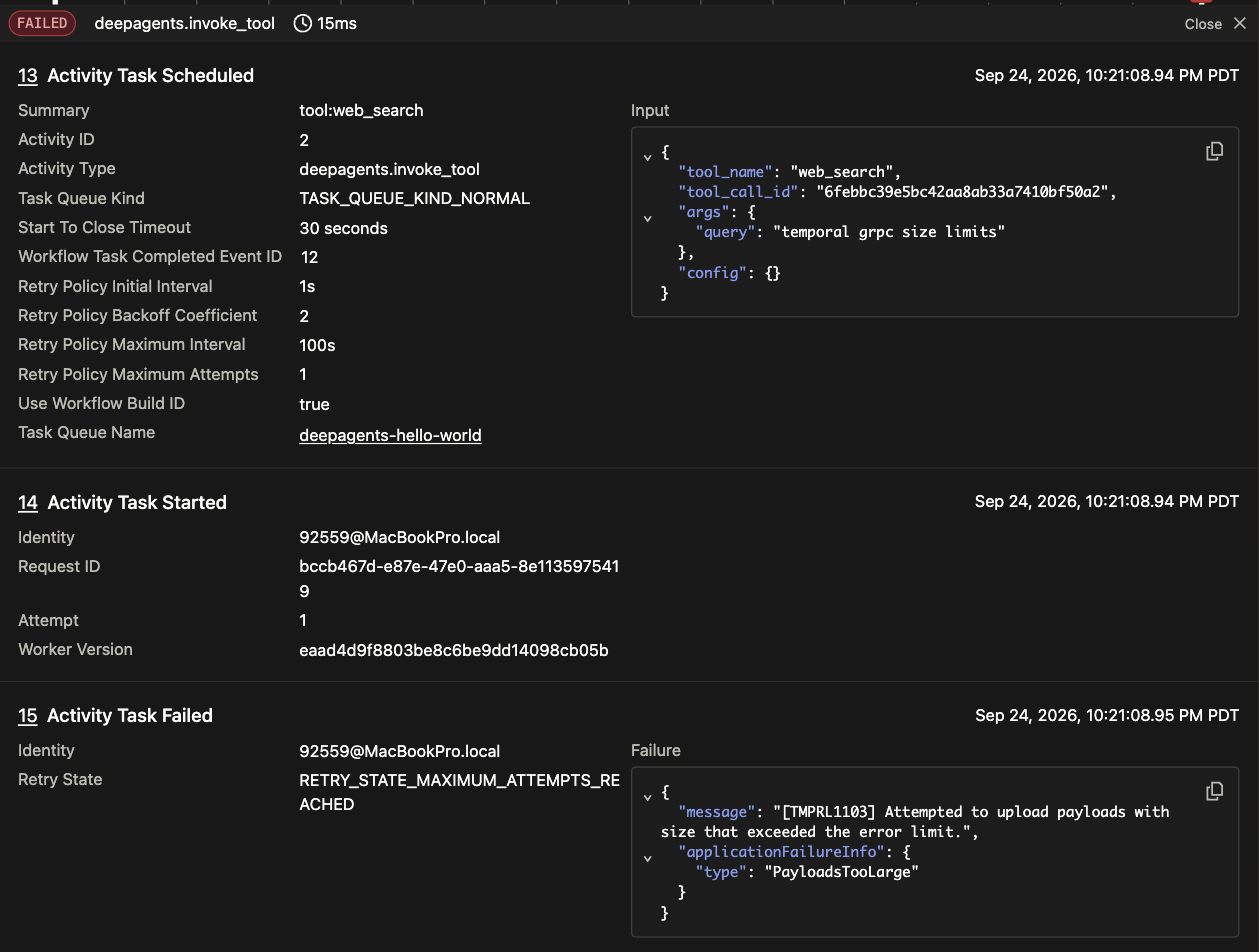 Events 13–15: scheduled, started, then failed with
 [TMPRL1103] / PayloadsTooLarge. RETRY_STATE_MAXIMUM_ATTEMPTS_REACHED because the retry policy allows one attempt.
Two separate size limits
The error above actually comes from one of two size limits, enforced at two different layers.
1. limit.blobSize, checked on the client side. Temporal’s server has two settings for how big a single Payload can be: limit.blobSize.warn (512 KB by default, just logs a warning) and limit.blobSize.error (2 MB by default, rejects the write). The SDK checks this before the gRPC call even goes out, so the error comes back fast, with a clear message — the TMPRL1103 above. The worker log shows the exact numbers:
1
[TMPRL1103] Attempted to upload payloads with size that exceeded the error limit. size=6291711 limit=2097152
6291711 bytes is the 6 MB tool result. 2097152 is exactly 2 MB.
2. gRPC’s own message size limit, a fixed transport ceiling. limit.blobSize.error can be changed. Raise it past the payload size, and the SDK stops blocking the send — the request goes out over the wire and hits gRPC’s own frame limit instead. That limit defaults to 4 MB, and neither the Deep Agents integration nor limit.blobSize has any control over it. Here’s the dev server restarted with the guard raised:
1
2
3
4
temporal server start-dev \
  --db-filename "$(pwd)/temporal.db" \
  --ui-port 8233 \
  --dynamic-config-value limit.blobSize.error=10485760
Running the same test again now gets past the client-side guard — it’s just a warning this time — and hits the transport limit instead:
1
2
3
4
5
6
[TMPRL1103] Attempted to upload payloads with size that exceeded the warning limit. size=6291711 limit=524288
Network error while completing activity error=Status {
  code: ResourceExhausted,
  message: "grpc: received message after decompression larger than max 4194304",
  metadata: {"message-too-large": "0"}
}
4194304 bytes is exactly 4 MB. This shows up as a network error, not an application error, so the SDK treats it as temporary and keeps retrying the activity-completion call until the Activity’s start_to_close_timeout runs out. What the Workflow actually sees is a timeout, not a message about size.
Staying under the limit still has a cost
A payload under 2 MB won’t trigger the error above. But it still gets written into the Workflow’s event history, along with every other Activity result and Workflow input and output. Temporal replays that history to rebuild state after a crash or a cache miss. A bigger payload means more write I/O on the persistence store. The local dev server’s SQLite feels this first, since it only allows one writer at a time. Postgres, MySQL, and Cassandra pay the same cost, but they have more room to absorb it. A bigger payload also means more work to deserialize the history on every replay, and bigger responses from the Web UI and other visibility queries. None of this causes an error. It just adds up with every large tool call a Workflow makes.
There’s a second limit behind this one: the total size and event count of the Workflow’s history. History size warns around 10 MB and errors around 50 MB. Event count warns around 10K events and errors around 50K events. A Deep Agent session that calls tools repeatedly can reach this limit even if no single call is large. Say each tool call returns a “safe” 200–300 KB — that never trips limit.blobSize, but it can still push the Workflow into continue-as-new, or make it fail, just from the history growing over time. The same applies to the model-call Activity’s input, since Deep Agents resend the full message history to the model on every turn.
Where large tool data can be stored instead
The size limits and history limits above only apply to data that flows through the Workflow’s event history — Activity results, Workflow inputs, and outputs. A tool’s data doesn’t have to go through that path. TemporalBackend wraps a real-I/O backend, like FilesystemBackend, LocalShellBackend, or StoreBackend, so its operations run through the backend_op activity. The backend itself, where the data actually lives, is something the developer supplies. deepagents.backends ships the interfaces and a few reference implementations, not a storage service.
A few other tools in the agent ecosystem are built around this same need: giving an agent storage outside its message history. agentfs is filesystem-shaped storage built for AI agents, backed by Neon Postgres. The OpenAI Agents SDK has a Manifest abstraction for mounting S3, GCS, Azure Blob, or Cloudflare R2 into an agent’s sandboxed workspace. General-purpose stores like S3, or a mounted service like Box Mount, can also be read and written directly by a tool or Activity, with no agent framework involved. Any of these can sit behind a web_search-style tool. The tool then returns a reference — a path, a URL, an ID — instead of the raw content, so the Activity result stays small.
Does the Workflow/Activity split still matter with external storage?
Say a dedicated storage layer already handles checkpoints, tool responses, and message history outside Temporal. None of the size limits above would apply anymore. So what does the Workflow/Activity split still add?
There’s another way to build this: run the entire Deep Agent inside a single Temporal Activity. Temporal’s job shrinks to making sure that Activity runs to completion, retrying it if it fails. None of the agent’s internal state touches Temporal’s Workflow history in this setup. LangGraph and Deep Agents write that state directly to the dedicated storage instead, using their own checkpointing. Replay, retry, and recovery for the agent’s control loop all happen at that layer, not in Temporal.
The two setups split responsibility differently. In the current integration, every model call and every tool call is its own Activity, each with its own retry policy, timeout, and entry in Temporal’s Workflow history. Keeping the control loop in the Workflow is also what makes the human-in-the-loop pattern work: pausing the agent, then resuming it through a Workflow update. A Temporal Activity can’t expose queries or updates the way a Workflow can, so that pattern only works if the control loop stays in the Workflow.
The single-Activity setup works differently. Temporal doesn’t track the agent’s progress — when it retries a failed Activity, it just calls the Activity function again from the top. What happens next depends on the agent’s own checkpointer. If Deep Agents has been saving its state to the dedicated storage as it runs, that fresh call to the Activity function can read the checkpoint and pick up from wherever the agent stopped, instead of starting the session over. Temporal restarts the function; the checkpoint is what lets the agent resume from where it left off instead of redoing the whole session.