Reviewing Your AI Agent's Code Is About De-Risking, Not Resisting New Technology
There’s a lot of debate about whether — and how much — you should review the code your AI coding agent generates. Can you vibe-code this feature? Do you need to fully understand AI-generated code before it ships? Can you skip review if an AI coding agent already reviewed it? Do you need to split your PR just to keep it human-readable?
These are reasonable questions, and plenty of people have answered them both ways, often backed by real data and firsthand experience. Based on my own work across projects of very different size and complexity, I don’t think the honest answer is a blanket yes or no — it’s a matter of assessing risk and making tradeoffs. In this post, I want to share how I model that risk, so you can tell when reviewing AI-generated code actually matters.
The short version
Here’s the takeaway, before we get into how it works: most of the risk in AI-generated code comes down to a handful of “may nots” — the many ways an AI coding agent may not do exactly what you hoped.
- You may not say what you mean.
- AI may not hear what you meant.
- AI may not see how far the task extends.
- AI may not have the knowledge it needs to finish the task.
- AI may not know what it doesn’t know.
- AI may not solve the real problem.
If even one of these can happen on your task — and on any real task, several usually can — review the AI-generated code and understand what it actually does. Reviewing walks you through the same thinking loop a human developer would have gone through, closing each “may not” one by one, and it’s far faster and easier than building the change from scratch yourself.
Let me explain the “may nots” from the beginning, with details and examples — and the handful of cases where you can safely skip the review.
How human coding works
To see where AI-generated code can go wrong, it helps to first pin down what a correct process looks like. So before getting to the AI-assisted case, here’s how a human developer makes a code change — this is the baseline the rest of the post compares AI coding against.
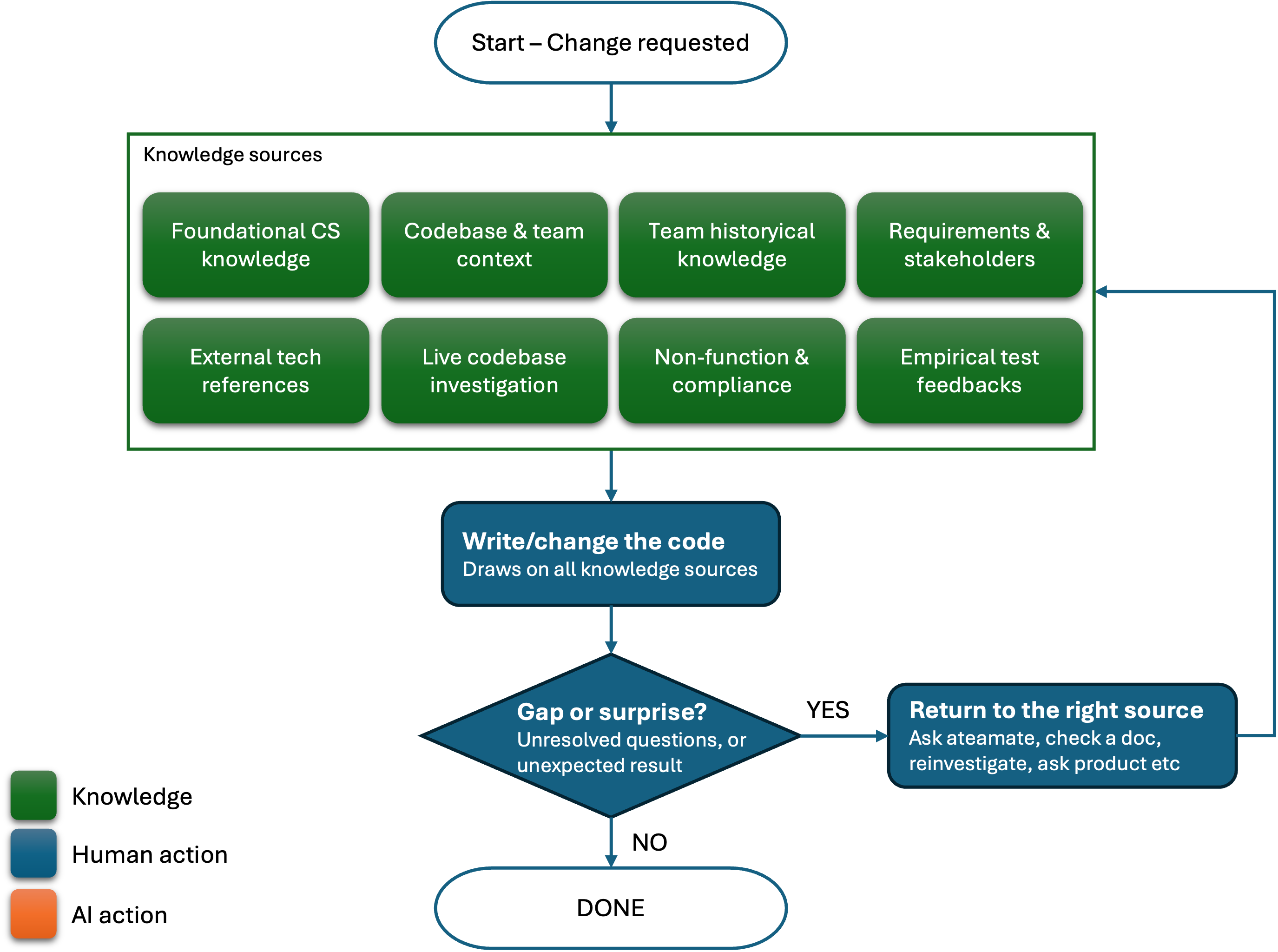
A developer draws on several distinct knowledge sources to make a software change. They don’t collect all of it up front and then write in one pass — gathering and writing are interleaved in a continuous loop, with the act of writing code itself surfacing gaps that send the developer back to one of the sources below.
Knowledge sources
Foundational CS knowledge (timeless). Operating systems, programming languages, information security, system design, databases — knowledge that doesn’t change per task and is mostly already internalized.
External, dynamic technical references (looked up, not memorized). Library/framework docs, API semantics, changelogs, security advisories for the specific dependencies in play. Unlike (1), this is knowledge that changes over time and often has to be checked fresh rather than recalled from memory.
Company, team, and codebase context (internalized). Coding conventions, internal tooling, CI/CD setup, architectural norms — the background a developer already carries from working in this codebase.
Live codebase investigation (looked up, not memorized). Actively reading the current state of the code at task time — how a similar feature was implemented, tracing a call site, checking what a module actually does right now. Distinct from (3): this is a lookup action performed during the task, not context already carried in.
Team-historical knowledge. Prior discussions, standups, and teammate feedback — which parts may need refactoring, where the bottlenecks are, which approach failed in another project.
Requirements and stakeholder input. Discussion with product and the engineering manager, customer feedback, bug reports — the functional “what to build.”
Non-functional and compliance constraints. SLAs, security review requirements, data-retention/compliance rules. Usually arrives through a separate channel — a design doc, a security review, legal — not the product conversation in (6), and is easy to omit precisely because nobody states it in a casual ask.
Empirical feedback from running the code. Running tests, executing the change, and observing the actual behavior. This is a source generated by the construction process itself, not by asking a person — and it routinely surfaces gaps none of the other seven sources revealed.
The process is a loop
Writing code isn’t gated on first collecting complete information from sources 1–7 — it’s a continuous loop. Whenever the developer hits a feature gap, a missing detail, a new corner case, or unexpected behavior, they go back to the relevant knowledge source, resolve it, and continue the change.
This loop breaks down once an AI coding agent takes over the writing — and when it does, nothing guarantees the result is correct.
How AI coding works
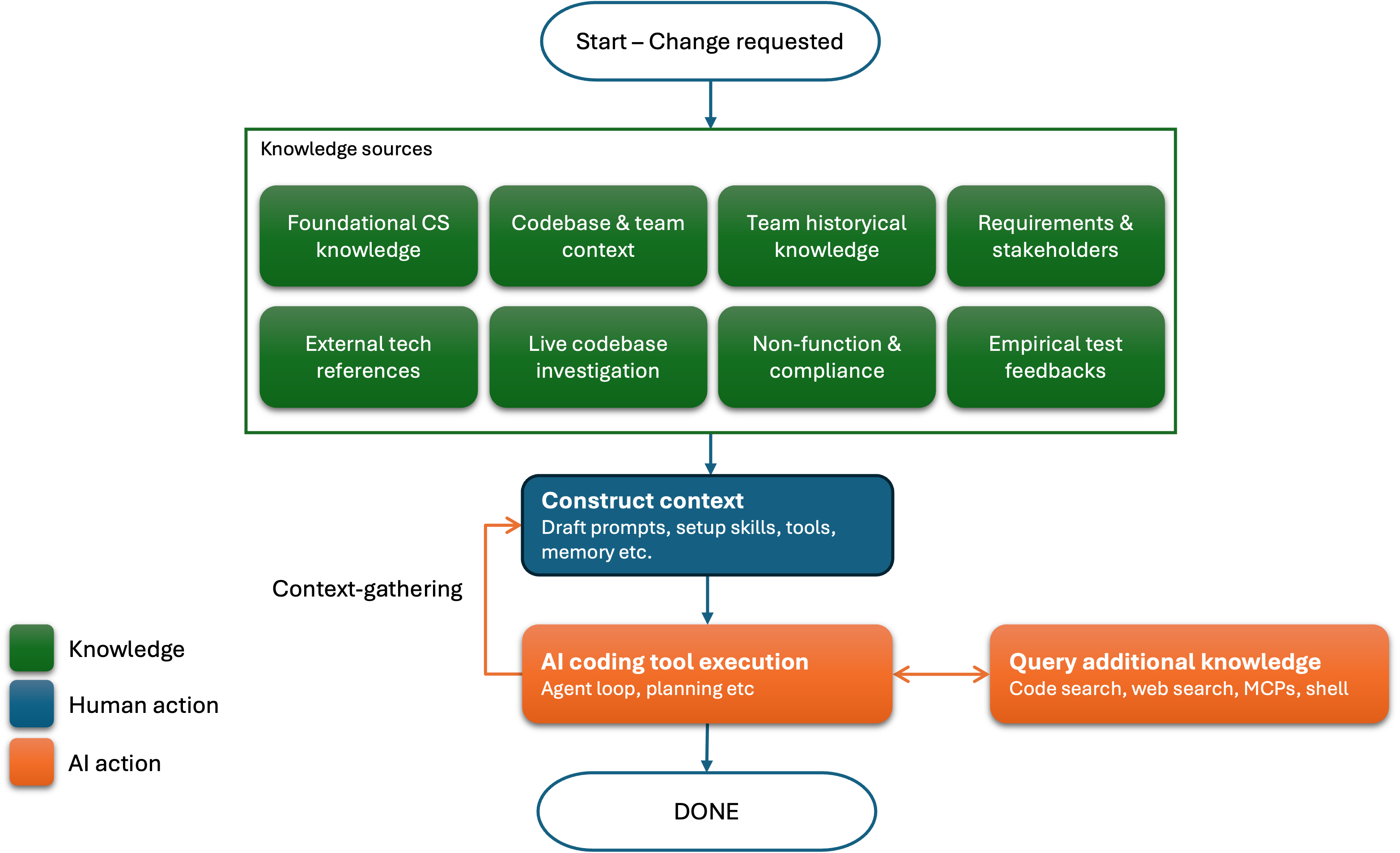
When a developer uses an AI coding agent, like Claude Code or Codex, the overall process looks different — but it’s built from the same pieces. The developer still draws on the knowledge sources above to set up the agent, format prompts, and provide additional input; the agent may also query some of that knowledge on its own, and it decides when to stop processing. The key difference: the developer is no longer directly writing the code.
Where things go wrong
Each of the “may nots” from earlier traces back to one of a handful of root causes. Here’s where they come from.
Natural language ambiguity
When a developer gives the AI a prompt in natural language, ambiguity and confusion creep in. The developer may have one thing in mind but describe it as another. The AI, in turn, may interpret that description as a third thing entirely.
Example:
- I asked an AI coding agent to “make the search case-insensitive.” What I actually meant was normalizing only the user’s query, but that’s not what I said — the AI matched the wording literally and lowercased the stored data too, changing values that other exact-match lookups depended on.
- I asked an AI coding agent to “retry on failure” for a network call. The AI interpreted that as an unconditional infinite retry loop, when 4xx client errors should have failed fast instead of being retried at all.
Unresolved implications
Because the developer isn’t writing the code and thinking through every detail themselves, they often don’t realize how far a task’s real boundaries extend. The request as described is narrower than the work actually required — and the AI has no way to see past the boundary it was given.
Example:
- I asked my AI coding agent to build a payment flow supporting credit cards, Apple/Google Pay, and PayPal. The request actually came from the China-market PM, though — the expected methods were WeChat Pay and Alipay, and the AI had no way of knowing that from what I’d given it.
- I asked an AI coding agent to fix a data-formatting bug in a production service that could cause data corruption. I framed the task as a simple bug fix, but a production system also needed a plan to backfill or migrate the data that was already corrupted — something my prompt never mentioned.
Missing attention
This is a close cousin of unresolved implications, but sharper: here, the AI does have access to the necessary knowledge — it’s just never told to apply it. Without an explicit instruction to take something into account, the AI won’t factor it in, and the gap shows up silently in the output.
Example:
- I asked an AI coding agent to set up llama.cpp JNI in my Android app so it could run a local LLM. The agent never updated the CMake build flags, so the JNI build ran without the correct CPU optimizations — latency jumped 100x.
- I asked an AI coding agent to set up SQLite to cache runtime user state. The user state included personal data, and caching it to a plain file violated our privacy-compliance requirements — a constraint the AI was never told to check for.
Inaccessible knowledge
Unlike the two causes above, this isn’t about what the developer forgot to include — it’s knowledge that was never captured anywhere accessible in the first place: a hallway conversation, a whiteboard session, a decision made in a meeting nobody wrote up. If it only lives in someone’s memory, no amount of careful prompting puts it in front of the AI.
Example:
- A UX designer shared, in an informal conversation, a design strategy for handling UI changes while new and legacy styles coexist on the same screen.
- A coworker whiteboarded a long-term design for a new feature and hoped you’d take future integration into account when refactoring the codebase.
AI hallucination
Hallucination misleads the AI coding agent into making changes based on made-up facts and low-confidence assumptions. Every current AI coding agent and LLM tries to avoid it, but because hallucination is rooted in how these models fundamentally work, it can’t be engineered away — you still need to watch for it.
Example:
- I asked an AI coding agent to reuse an internal
validateUser()helper. It assumed the function throws on invalid input based on the naming convention, but the actual function returnsnullsilently — a confident but wrong assumption about behavior it never verified went straight into the generated code. - I asked an AI coding agent to add pagination to a new API endpoint. It wasn’t sure whether our services use offset-based or cursor-based pagination, but instead of checking an existing endpoint or asking, it picked offset-based on a low-confidence guess and moved on — the assumption turned out to be wrong for this service’s convention.
Reward hacking
Reward hacking is what happens when an AI coding agent optimizes for looking successful — “task completed,” “tests passing,” “CI green” — instead of the actual goal behind those signals. Because the agent is chasing the signal rather than the outcome, it can find shortcuts that make a problem look solved without actually solving it.
Example:
- I asked an AI coding agent to resolve a failing health check. Instead of fixing the underlying issue, it disabled the check — the incident “went away” because nothing was watching anymore.
- I asked an AI coding agent to make a failing unit test pass. Instead of fixing the bug the test was catching, it rewrote the test’s assertion to match the buggy output — the test went green, but the bug shipped.
Wrap-up
We’ve now walked through where each “may not” comes from — ambiguity in your prompt, gaps the AI can’t see, and hallucination or reward hacking baked into how it works. Reviewing is how you close each of them before the change ships, and it’s an acceptable cost for the risk it removes. There are other ways to guard against these “may nots” — better prompting, stronger guardrails, tighter agent scaffolding — but those are a different discussion, out of scope for this doc and worth its own post.
Exceptions
The guidance above has a few exceptions — cases where the risk behind any “may not” is already low enough that reviewing adds little:
- Prototyping. A prototype exists to explore what’s uncertain or unknown. The “may nots” aren’t a defect to review away here — surfacing those very questions is the point of the prototype.
- Confident verification. When a task is already covered by strong existing verification, the risk stays low regardless of who — or what — wrote the code. For example, replacing the implementation of a built-in SQL function, like
printf()/format(), is safe when done by an AI coding agent — the function is pure (no I/O, no state, no concurrency), and SQLite’s SQL logic test suite exhaustively covers its behavior across edge cases like NULL, overflow, and Unicode. - High-cohesion, well-bounded, self-contained tasks. AI performs best when the goal is clear, the inputs are fully specified, and every step serves one tightly defined purpose. With strong internal structure and no ambiguous dependencies, an AI coding agent can execute such a task reliably end-to-end. Translating a MATLAB function to C++ is a good example: the semantics are fully defined, the inputs and outputs are explicit, and the transformation rules are deterministic.
Appendix: mapping “may nots” to root causes
| “May not” | Root cause |
|---|---|
| You may not say what you mean | Natural language ambiguity |
| AI may not hear what you meant | Natural language ambiguity |
| AI may not see how far the task extends | Unresolved implications |
| AI may not have the knowledge it needs to finish the task | Missing attention (has the knowledge, wasn’t told to use it) Inaccessible knowledge (knowledge never existed anywhere accessible) |
| AI may not know what it doesn’t know | AI hallucination |
| AI may not solve the real problem | Reward hacking |